Probé los conversores de Lovable a WordPress más populares: ninguno construye WooCommerce real (y aquí está la prueba)
El contexto: por qué necesitaba pasar un proyecto de Lovable a WordPress
Quizá para muchas agencias de marketing crear sitios web de forma "rápida" sea lo más beneficioso. Sin embargo, crear sitios web con IA tiene una implicación muy importante: no se trata solo de armar una landing, muchas empresas necesitan un sitio que tenga conversiones, que sea funcional y amigable de administrar.
WordPress es un CMS que, a lo largo de su evolución, ha traído optimizaciones para que los usuarios finales no-coders lo elijan por defecto para crear sitios web — desde landing pages hasta ecommerce completos. Sin embargo, también se han hecho populares muchos plugins con este mismo propósito, como Elementor, WPBakery o Avada Builder. El problema es que estos plugins agregan un peso irracional a los sitios web, y por eso me di a la tarea de buscar opciones más válidas y óptimas para el desarrollo con IA.
Tenía un proyecto construido en Lovable que necesitaba convertirse en un sitio WordPress real. No un mockup que se viera bien en una demo, sino algo con lo que un cliente pudiera trabajar todos los días: editor de bloques para el equipo de marketing, WooCommerce funcionando de verdad, carrito, checkout, todo — sin arrastrar el peso muerto de un page builder tradicional.
La pregunta obvia antes de ponerme a escribir PHP a mano fue: ¿existe ya una herramienta que haga esto automáticamente? Hay varias que prometen justo eso — subes tu ZIP de Lovable, y en minutos tienes un tema WordPress instalable. Antes de descartarlas, las probé.
Cómo dicen que funcionan estas herramientas
Lo que prometen en el marketing
El pitch es prácticamente idéntico en todas: subes el export de tu proyecto (Lovable, v0, Cursor, Claude), la herramienta "parsea" el layout, los estilos y la estructura, y te devuelve un .zip con un tema WordPress instalable. Cero código. Minutos, no días.
Lo que realmente dicen su propia documentación
Aquí es donde vale la pena leer la letra pequeña, porque ellos mismos son honestos al respecto — solo que no lo ponen en el titular. En su página dedicada a la conversión de Lovable, WPConvert.ai admite directamente que la lógica dinámica de la app, la autenticación, las bases de datos y los flujos de API del backend no se transfieren en la conversión, y recomiendan planear plugins o código custom para eso después de instalar el tema.
Sobre WooCommerce específicamente, son igual de claros: convierten el diseño y la estructura de páginas, y el catálogo de productos sí se puede importar a WooCommerce — pero cualquier otra lógica o herramienta de la app requiere reconstrucción manual después de la conversión. Es decir, el catálogo entra, pero el carrito, el checkout custom y cualquier comportamiento dinámico, no.
No es el único caso. WP Pro Converter — un conversor genérico de HTML a WordPress, no específico de Lovable — admite en su propia FAQ que si tu sitio usa un framework como React, Angular o Vue, vas a necesitar hacer ajustes manuales al código generado para que funcione correctamente. Y su plan más accesible (Express, sin IA) es explícitamente un clonado visual: nada de bloques de Gutenberg reales.
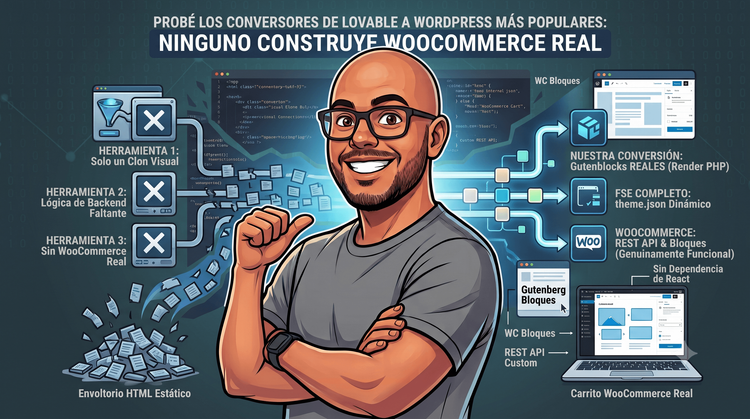
Traducido: lo que hacen estas herramientas es tomar el HTML ya renderizado — el resultado final, estático — y mapearlo a una plantilla de WordPress. No convierten tu lógica de aplicación. No convierten tus componentes React a bloques de Gutenberg reales. No tocan el comportamiento de WooCommerce más allá del catálogo. Todo eso queda, literalmente, para "después de instalar el tema".
Eso no es una crítica infundada — es lo que ellos mismos describen en sus FAQs y páginas de producto. El problema es que ese detalle vive tres scrolls por debajo del botón "Convertir ahora".
La prueba: convertí el mismo tipo de proyecto por mi cuenta
En vez de quedarme con la teoría, hice la conversión completa a mano para el mismo tipo de proyecto (React + Lovable, con e-commerce), y documenté cada decisión.
El punto de partida
Creé un diseño en Google Stitch con el siguiente prompt:
Hola, quisiera que por favor me ayudes a crear un diseño de un sitio web basado en una página la cual se basa en venta de productos de belleza. La idea es que los productos sean mostrados como un carrusel. Los colores deben ser piel y vinotinto, con una fuente elegante y el proyecto se llama redwine.
La idea inicial era crear un sitio web simple pero con el poder de convertir usuarios. Esto solo es una base de diseño que hice a modo de ejemplo.
Puedes ver el diseño original en Lovable aquí y la exploración previa que hice en Google Stitch aquí.
Bloques Gutenberg reales, no un wrapper de React
En vez de envolver los componentes de React dentro de un iframe o dejarlos como HTML estático, cada sección visual del sitio (hero, colecciones, sobre nosotros, newsletter, footer) se convirtió en un bloque dinámico de Gutenberg de verdad: block.json, edit.js para el editor, y un render_callback en PHP que genera el HTML en el servidor. Eso significa que el equipo de marketing puede editar contenido, reordenar bloques y cambiar atributos desde el editor nativo de WordPress — no está viendo una caja negra estática.
FSE de verdad, no plantillas fijas
Full Site Editing con theme.json para tokens de diseño (colores, tipografía, spacing) portados directamente desde el proyecto original, más templates/ y parts/ en HTML de bloques. Nada de header.php ni footer.php de la vieja escuela — y nada de HTML estático inyectado a la fuerza en una sola plantilla genérica.
WooCommerce que funciona, no un shortcode pegado con cinta
Aquí está la diferencia más grande. Dependiendo de la versión de WordPress (≥6.5 o <6.5), la implementación usa bloques nativos de WooCommerce (product-collection, add-to-cart-form) o el shortcode clásico [products]. El carrito lateral corre con JavaScript vanilla y una REST API custom (register_rest_route()), no con React Context — porque en el momento en que sales del mundo de Lovable, seguir dependiendo de React para el estado del carrito es arrastrar deuda técnica innecesaria a un CMS que no lo necesita.
Ningún conversor automático que probé llega ni cerca de esto. En el mejor de los casos, te dan una página de producto que se ve bien pero no vende nada — hay que instalar WooCommerce después, configurar productos a mano, y reconstruir el carrito desde cero.
🔗 Puedes ver el resultado en vivo — el tema corriendo en un WordPress real, con WooCommerce funcional, aquí: demo del tema. No es una captura de pantalla, es el sitio real.
Comparativa directa
| Conversores automáticos | Conversión real (mi approach) | |
|---|---|---|
| Bloques Gutenberg | HTML estático inyectado en plantilla | Bloques dinámicos con render_callback PHP |
| WooCommerce | No incluido — "instala plugins después" | Classic shortcode o Blocks nativos según versión de WP |
| Carrito | Sin soporte | REST API custom, sin dependencia de React |
| Editor de bloques (Inspector) | No aplica | Sí, con @wordpress/components |
| Auth / lógica de negocio | Se pierde por completo | Migrada explícitamente, caso por caso |
| Tiempo | Minutos | Días (dependiendo de la complejidad) |
| Resultado | Maqueta que parece un tema | Tema funcional listo para producción |
Por qué la diferencia importa (y a quién le importa)
Si estás migrando una landing personal sin lógica de negocio, un conversor automático probablemente te ahorre tiempo y el resultado sea perfectamente aceptable — no estoy diciendo que estas herramientas no sirvan para nada.
El problema aparece cuando el proyecto tiene e-commerce, autenticación o cualquier lógica que dependía del backend de Lovable. Ahí, un conversor automático no te da un tema WordPress: te da una foto de tu sitio disfrazada de tema. Se ve igual en la primera captura de pantalla, pero en el momento en que el cliente intenta vender un producto, todo se cae.
Para agencias y freelancers que entregan sitios a clientes, esto es peligroso: el "ahorro" de tiempo en la conversión se paga después, cuando el cliente descubre — normalmente en producción, normalmente en el peor momento — que el carrito no existe.
Cómo lo hice (resumen técnico)
A grandes rasgos, el proceso fue:
- Analizar el proyecto de Lovable completo: rutas, componentes por página, manejo de estado, llamadas a API, lógica de e-commerce.
- Extraer los design tokens (colores, tipografía, spacing) a
theme.json. - Identificar qué secciones se convierten en bloques y cuáles son partes estáticas del layout (header, footer).
- Construir cada bloque con su build pipeline (
wp-scripts+ Vite para Tailwind). - Armar las plantillas FSE y conectar WooCommerce según la versión de WordPress objetivo.
- Construir el carrito lateral con JS vanilla y la REST API custom.
- Crear una skill reutilizable para poder pasar cualquier proyecto de Lovable a WordPress, usando DeepSeek V4 Flash (suscripción OpenCode GO) para la planificación y BigPickle (free) para la ejecución de la creación del tema, todo desde OpenCode.
Es un proceso de dos días, no de minutos — pero el resultado es un sitio que un desarrollador WordPress puede mantener sin tener que deshacer nada primero.
Beneficios
Quizás pensando en esto te preguntes: si ya puedo construir el stack completo con IA, ¿qué beneficio trae pasarlo a WordPress? A primera vista no es obvio, pero para una plataforma que va a necesitar ecommerce, empezar con WordPress reduce costos de despliegue desde el día uno — cualquier hosting compartido te sirve para tener el sitio funcionando. Ya tienes un builder optimizado para su propia construcción, y si quieres agregar más funciones, puedes seguir la misma lógica sin volver a Lovable: solo iteras con el mismo agente sobre WordPress.
Ojo: no estoy diciendo que la IA te va a hacer todo. La idea es planificar bien el proyecto a través de Spec Driven Development (SDD).
Por otro lado, las métricas de Google Lighthouse son notablemente buenas — al no ser un sitio basado en virtual DOM como las apps típicas de React, el procesamiento de SEO y performance queda más optimizado. Dejo una captura de las métricas del sitio:
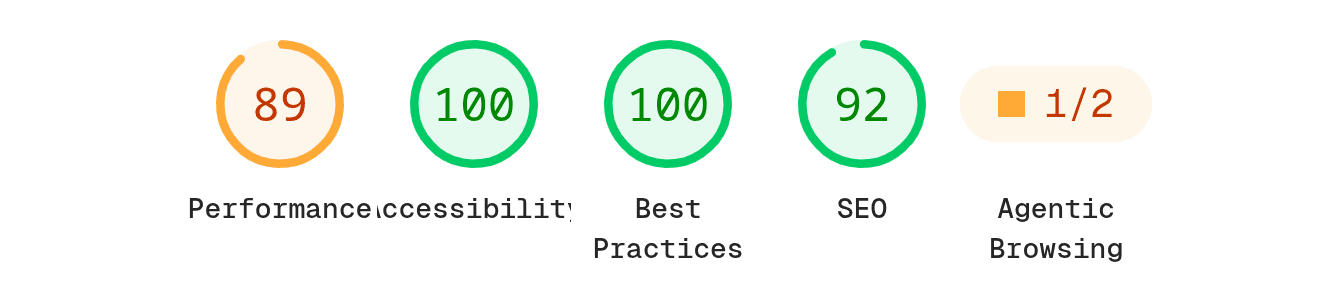
Como puedes ver, solo falta iterar un poco más para llegar al 100% en todos los aspectos.
Conclusión
Las herramientas de conversión automática tienen su lugar: prototipos rápidos, landings sin lógica de backend, validación de una idea antes de invertir en una conversión real. Lo que no hacen — y lo dicen ellas mismas en su documentación, aunque no en su titular — es construir un WordPress real con WooCommerce funcional.
Si tu proyecto tiene e-commerce, autenticación o cualquier pieza de lógica de negocio, necesitas una conversión hecha por alguien que entienda tanto el stack de origen como WordPress a nivel de arquitectura. Si es tu caso — o si te interesa adquirir la skill y una asesoría sobre cómo implementarla — agenda una consulta conmigo.